The Field Service Management Workflow: 9 Stages of a Commercial Job, From Request to Paid Invoice


At 7:42 on a Tuesday morning in March, a facility manager calls her maintenance contractor. One of the two chillers serving her office building has tripped, and the upper floors are getting warm. A technician gets there before lunch, finds a failed condenser fan motor and orders a replacement. He fits it on Friday morning. The repair itself takes a little over two hours.
The invoice goes out eleven days after the client signs the job off. Payment arrives seven weeks after that first phone call.
Nobody did anything badly wrong. The technician was quick and the part came within two days. Most of those seven weeks went on waiting, first for a part, then for a signature, and finally for someone in the office to type up a service sheet. Managing that waiting is most of what a field service workflow is for, and it’s where most of the lost time can be won back.
This guide follows the nine stages of a commercial job from the first call to the paid invoice. For each one you’ll see the status the job carries, the timestamp that closes the stage, who owns it, and where it tends to get stuck. There’s also a status model you can copy into your own system, and a way to map your current workflow using 20 closed jobs.
What a field service workflow is
A field service workflow is the sequence of stages a job passes through, from the moment a request comes in until it’s paid for, together with the rules for moving it from one stage to the next. Each stage usually shows up as a status on the work order.
It helps to keep this separate from a process. The way your technicians carry out a fire damper inspection is a process. The workflow covers how that inspection got onto the schedule and how, once it was done, it turned into an invoice. Plenty of contractors have skilled technicians and well-drilled procedures and still send invoices three weeks late.
The workflow lives in two places. One is the list of statuses your work orders can carry. The other is the set of rules about what has to happen before a job can move on. If nobody has written those rules down, they’re in your dispatcher’s head.
The workflow at a glance
Reactive requests come in at the top, through intake. Planned maintenance joins further down at scheduling, because the contract has already decided what needs doing and roughly when. After triage, some jobs need a quote before any work starts, and they wait in their own stage until the client approves. Once a technician is on site, any job can go on hold. When the hold clears, it goes back to scheduling for a return visit. All of these routes end the same way, with the work signed off and invoiced.
The nine stages
1. Intake
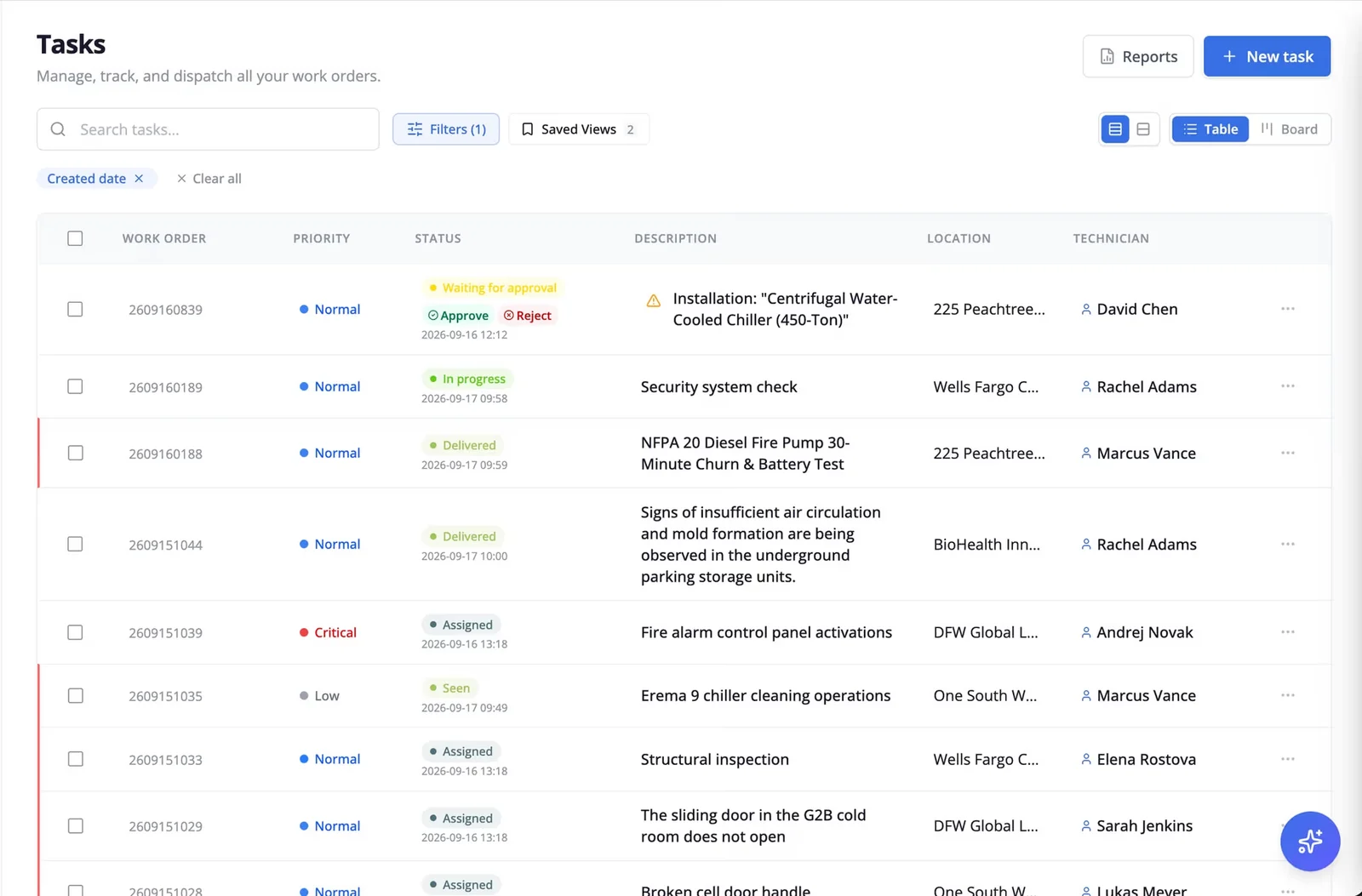
A request might arrive by phone, by email, through a client portal, or as a text to a technician who gave out his number on the last visit. However it comes in, it should land in one queue and become a work order with the status New.
Two timestamps matter at this stage. Request received is when the client reported the fault, and in most maintenance contracts that’s when the SLA clock starts. Acknowledged is when your team saw it and confirmed it.
The gap between those two is the first place jobs go missing. A fault emailed to an account manager who’s on leave can sit for a day before anyone logs it, while the client assumes you’ve known since 8 a.m. Our guide to field service management best practices covers how to bring every channel into one queue. A client portal helps with routine requests, since the client fills in the site, asset and description themselves.
2. Triage and priority
The dispatcher or helpdesk reads the request, sets a priority and job type, and decides whether a quote is needed. The status moves to Triaged.
Triage goes much more smoothly against a written priority matrix agreed with the client. Without one, priority depends on who picked up the phone and how worried the caller sounded. Keep in mind that the SLA clock doesn’t wait for triage. Under our service level agreement template it starts when the request is received, so a slow triage eats straight into the response time.
3. Quote and approval
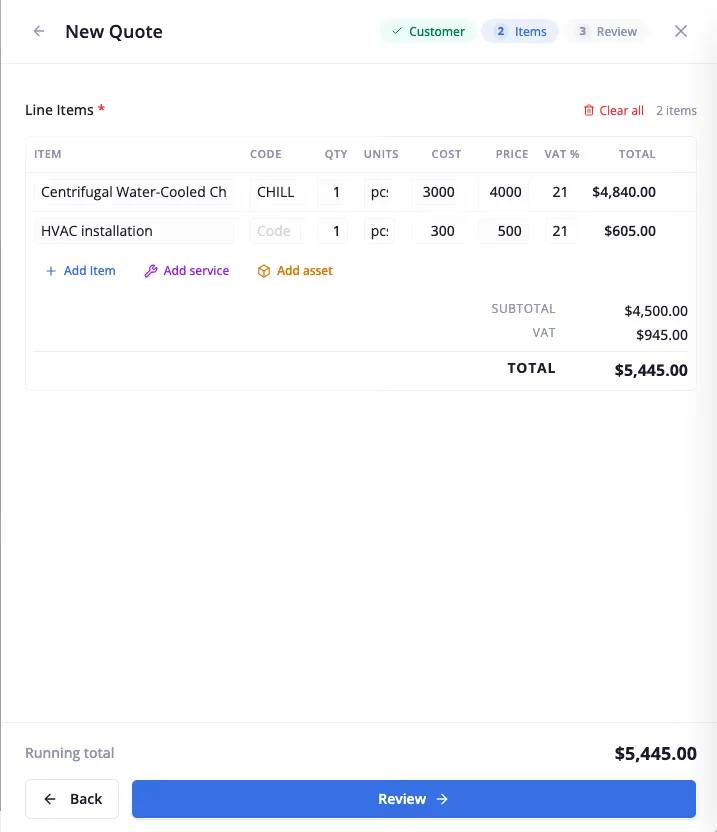
Only some jobs pass through here. Work outside the contract’s scope, or above an agreed spending limit, needs a quote first, and the job sits as Awaiting approval until the client says yes.
In commercial work this is often the longest single wait in the whole job. The quote goes to a facility manager, who forwards it to someone with a budget, who is in meetings until Thursday. Record two dates here, quote sent and quote approved. A fixed chase date, for example five working days after sending, stops quotes drifting for weeks, and an approval deadline written into the contract helps even more. In Serfy, an approved quote becomes a work order in one step, so nobody has to retype the scope.
4. Planning and scheduling
The job gets a technician and a time slot, and its status becomes Scheduled. Planned maintenance enters the workflow here. Nobody phones in a PM visit. The contract generates it months ahead, with a due date and a window it’s allowed to move within.
Scheduling a reactive job means weighing the SLA deadline against who is qualified and likely to have the parts. With planned work, the effort goes into grouping visits so technicians aren’t crossing the city between them. Our guide to field service route optimization goes into both, and our preventive maintenance checklist covers what each planned visit should include.
Record when the job was scheduled. Later, when you’re trying to work out whether a delay started in the office or in the field, that timestamp settles it.
5. Dispatch and preparation
The technician accepts the job, which becomes Dispatched, and later sets off, which makes it En route. Before leaving they should be able to read the asset’s history and the last visit’s notes, check how to get into the site, and see whether the likely parts are in the van.
It’s easy to treat this stage as a formality. In Aquant’s 2026 benchmark of 161 service organizations, visits that failed to fix the problem accounted for 25% of total service cost at the median company. Many of those failed visits start here, with a technician who arrived without the part or without knowing what the last person found. Our guide to field service inventory management looks at van stock in detail.
6. On-site work
The technician checks in on arrival and the job becomes On site. In most maintenance contracts that arrival timestamp is the SLA response time, so it should be recorded the moment they get there.
Then comes the work itself, along with the checklist, photos, readings, parts and hours. If any of that needs a mobile signal, it will fail in the basements and plant rooms where commercial technicians spend much of their day. A fully offline mobile app gets around that. So does keeping the close-out screen short. In a 2025 Salesforce survey of US field technicians, respondents said about 30% of their working time goes on admin, slightly more than the 28% spent delivering service.
7. Holds and return visits
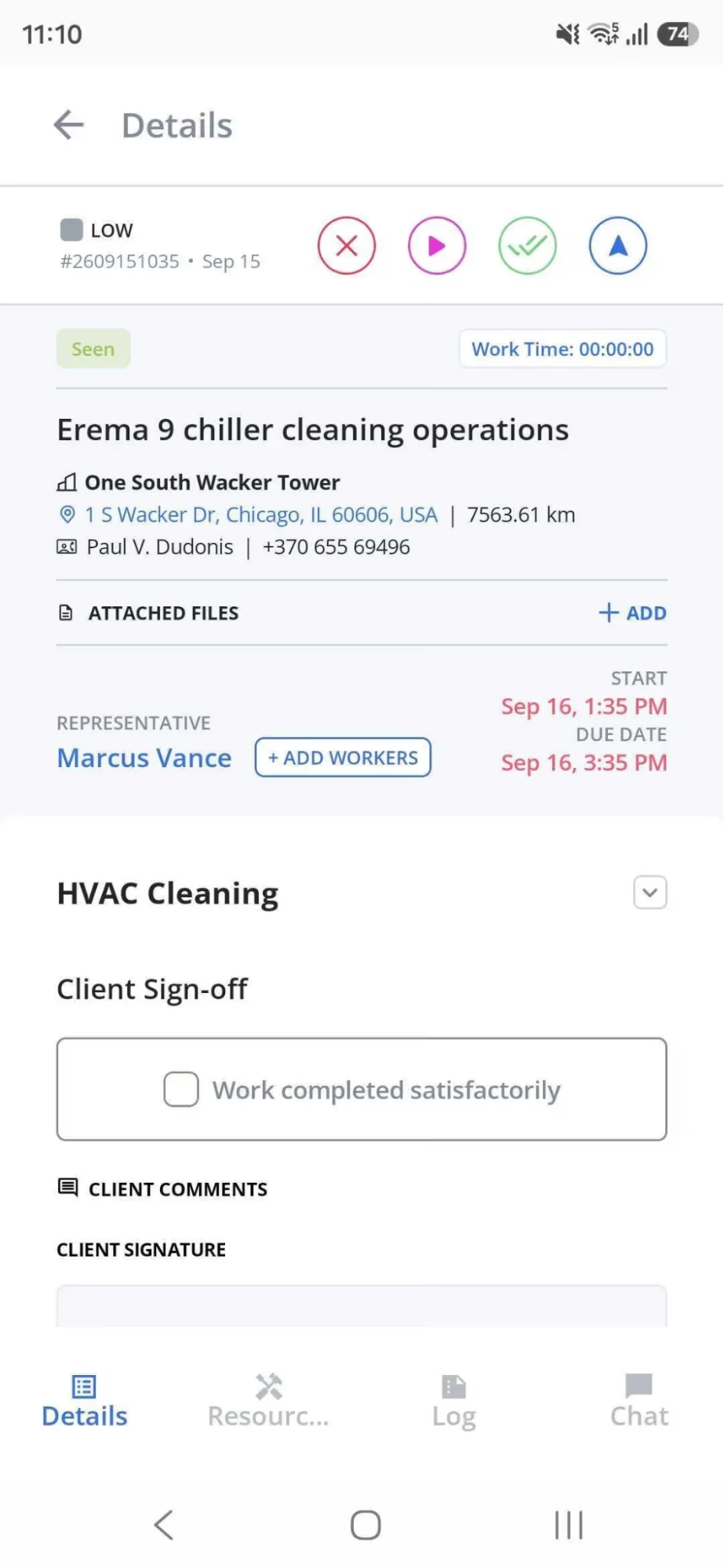
Some jobs can’t be finished on the first visit. The part isn’t in stock, a tenant won’t let anyone into their office until Monday, extra work needs a quote, or a specialist subcontractor has to come in. The job goes On hold.
Every hold needs a reason code and an owner. Parts holds belong to whoever orders the parts. Access and approval holds sit with the client, usually through the facility manager. Record when each hold started and when it cleared. With those dates you can see how long jobs have been waiting and chase the oldest ones first. They’re also your evidence for pausing the SLA clock. Our SLA template allows pauses for access, quote approval and parts the client has agreed to wait for, provided each pause and its reason are on the work order.
When the hold clears, the job goes back to scheduling for the return visit. Later on, the reason code also helps you decide whether that return visit should count against your first-time fix rate, which is one of the counting decisions covered in our field service management metrics guide.
8. Completion and sign-off
There are two statuses here, and they’re worth keeping apart. Completed means the technician has finished and recorded the work. Signed off means the client has accepted it. Usually they’re minutes apart. Sometimes the client contact is on holiday and a finished job sits unsigned for a week.
The best case is a signature on site, backed by photos and a few lines describing the work in terms a facility manager will understand. When that isn’t possible, an agreed acceptance window helps. Under our SLA template, if the client hasn’t objected within 48 hours of receiving the completion record, the job counts as signed off.
Keep the two timestamps separate. Our metrics guide measures invoicing lag from sign-off. If the two are merged, you can’t tell whether a slow invoice was the client’s delay or yours.
9. Invoicing and close
The job becomes Invoiced when the invoice goes out and Closed when it’s paid. The quickest way through this stage is to generate the invoice from the signed work order, with hours, parts and photos already attached. Caverion Baltics, which runs more than 300 technicians, cut invoice compilation from about two days to real time by working this way. With paper service sheets, someone in the office has to collect them, decipher the handwriting, check the parts and type everything into the accounting system. In the chiller example, that took eleven days.
Closed jobs still have work to do. They feed the monthly reports, and they become part of the asset history the next technician reads before their visit. Automated invoicing and the metrics guide cover both ends of that.
The status model
The graphic below lists every status a commercial job can carry. For each one it shows what moves a job into it, the timestamp to record and who owns the job while it’s there. Rename the statuses to suit your software if you like. Keep the transitions and timestamps as they are, because your reports are built on them.
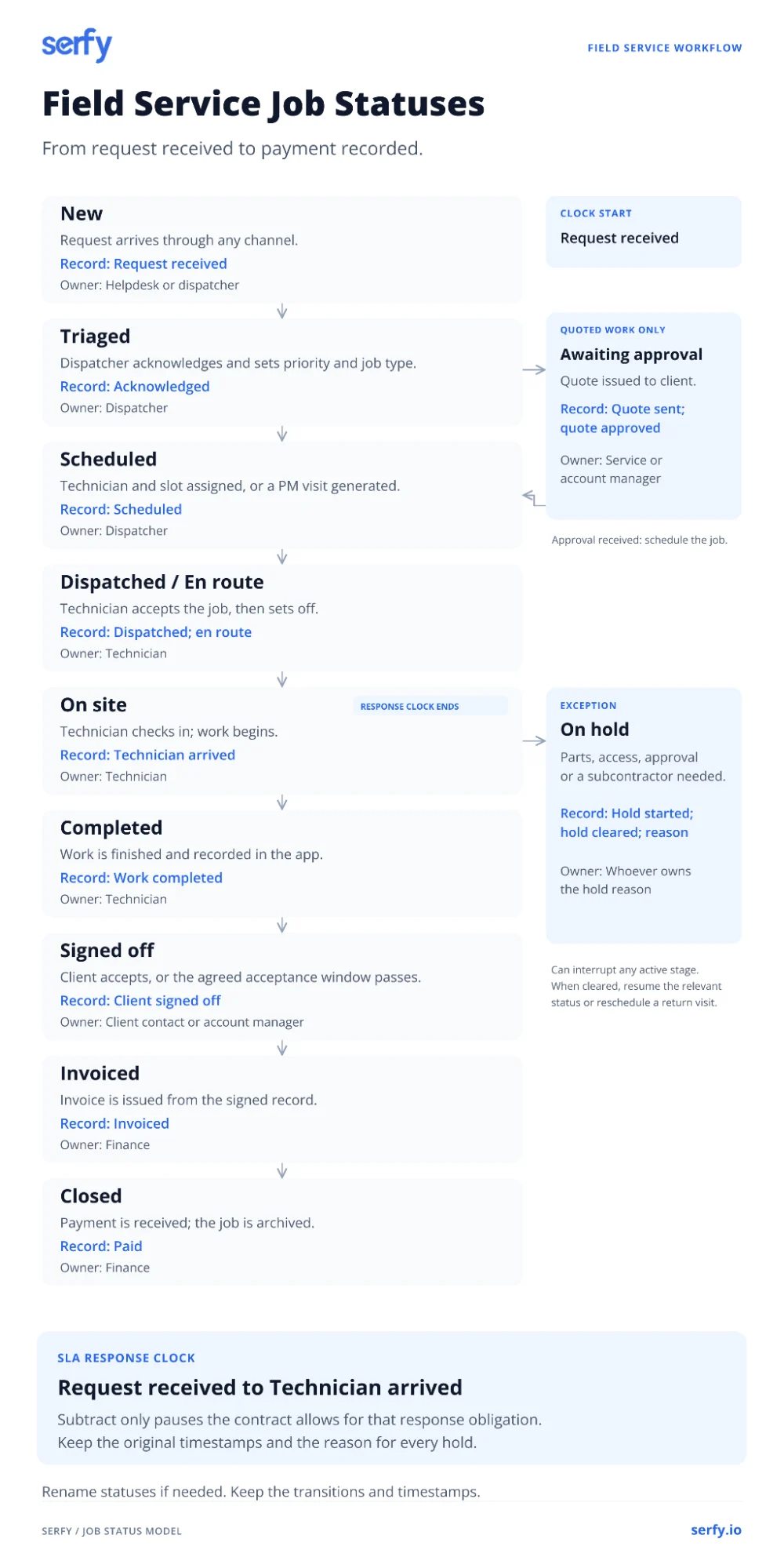
The SLA response clock runs from Request received to Technician arrived. On hold time only comes off when the reason is one the contract allows.
One job, traced
Here’s the chiller job from the start of this article, traced from the first phone call to the paid invoice. The details are illustrative, but most service managers will recognize the pattern. Look at how little of the timeline is spent on work.
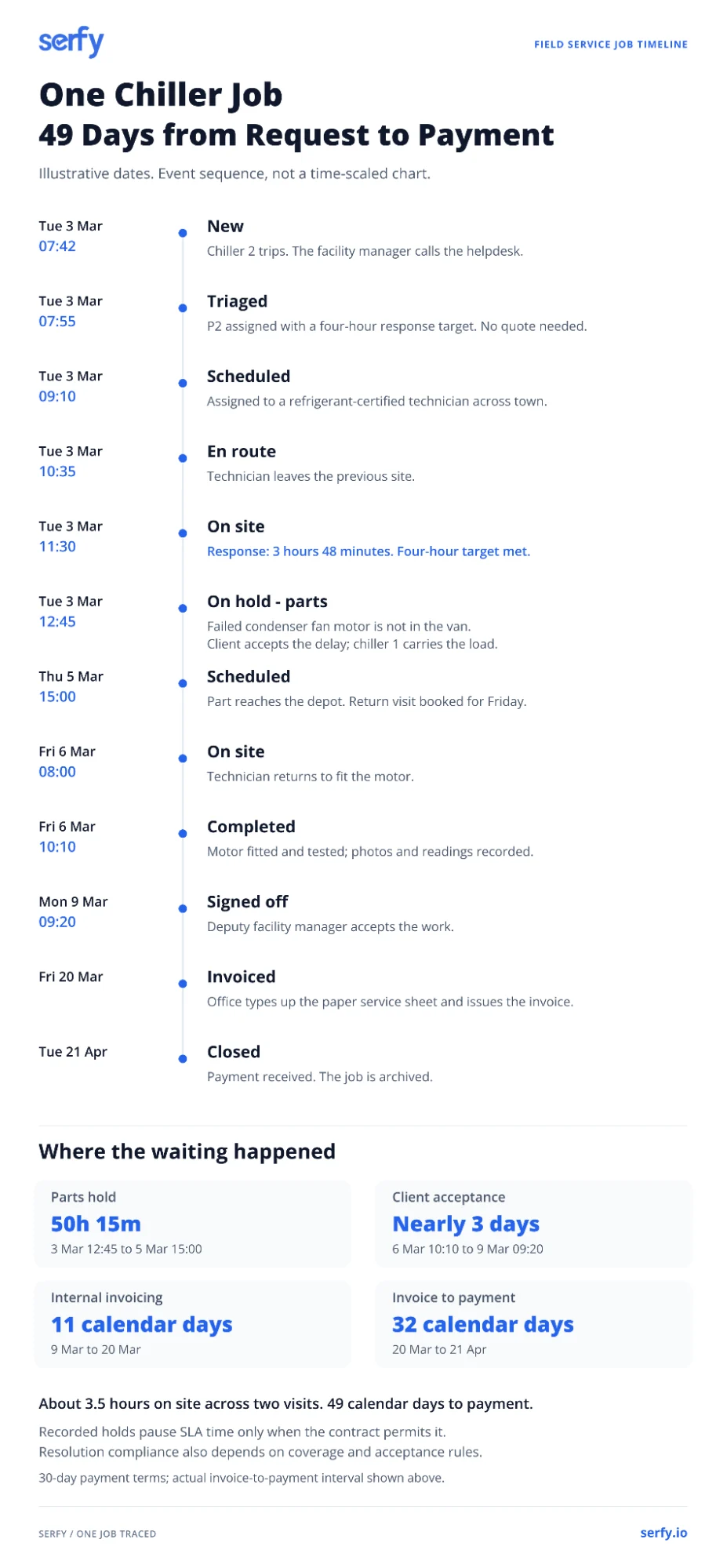
From the first call to payment took 49 days. The technician spent about three and a half hours on site across two visits. Even with travel, the job used perhaps five hours of anyone’s working time.
The rest of the time went on four waits. The parts hold lasted a little over two days, and it was a reasonable one, because the client agreed to it. Since the reason was recorded, the SLA clock paused, and the job used about one working day of its two-day resolution target. Without a recorded reason, the same job would have shown as a breach.
The wait for sign-off ran over a weekend and took three days. A named deputy or an acceptance window would have cut most of it.
The eleven days between sign-off and invoice were entirely internal. If the invoice had been generated from the signed record on Monday morning, the contractor would have been paid around 8 April, nearly two weeks earlier. The 30 days of payment terms are a commercial decision and largely outside the workflow.
Three variants of the same workflow
A reactive break/fix job follows the path traced above. It skips the quote stage unless the fault turns out to be outside the contract.
A planned maintenance job starts at scheduling, generated by the contract. It has no response time to meet. It’s measured against its due window instead, and what the client signs off is usually a completed checklist or inspection report. A PM visit often turns up other faults. Raise those as new work orders, reactive or quoted, so the PM visit can close on time and the extra work gets its own status and timestamps.
Quoted work involves two visits by design. The first is diagnostic and ends with a quote. The job then waits in Awaiting approval, and once approved it goes back to scheduling for the repair visit. Decide early whether that second visit counts as a return visit when you calculate first-time fix. We’d leave it out as long as the first visit’s diagnosis held up. Whatever you decide, apply it the same way every month.
Five handoffs where commercial jobs stall
Most delays happen in the gaps between stages, when a job is waiting for someone to pick it up. These are the handoffs worth checking first.
Request to triage
Requests that arrive somewhere other than your main queue, like a technician’s phone or an account manager’s inbox, can wait hours before anyone logs them. To find out how often this happens, compare when the client says they reported a fault with your Request received timestamp, for last month’s P1 and P2 jobs. If the two often differ, route every channel into one queue and make logging the first thing anyone does with a request.
Quote sent to quote approved
Look at how many quotes are older than ten working days. If there are more than a handful, you need a chase rule and an approval deadline in the contract. It also helps to know who on the client’s side can sign off spending, because it’s often not the person you send the quote to.
On hold to rescheduled
List every job that’s been on hold for more than a week and check whether each has a reason and an owner. The ones that don’t are usually the oldest. Make the reason code mandatory and review holds by age every week.
Completed to signed off
Count the jobs finished more than three days ago that still aren’t signed off. Most will belong to a few clients whose main contact is hard to reach. Ask those clients for a deputy contact, and put an acceptance window in the SLA.
Signed off to invoiced
Work out the median number of days between sign-off and invoice. Anything over a day or two usually means paper or retyping is involved. Generating invoices from the signed work order is the most direct fix, and it tends to have the quickest effect on cash.
Map your own workflow in an afternoon
You don’t need new software to see where your jobs wait. Pull 20 recently closed jobs, with a mix of reactive, planned and quoted work. Put them in a spreadsheet with one row per job and one column for each timestamp in the status model. Where a timestamp doesn’t exist, leave the cell empty. A column that’s mostly empty shows you something too.
Then add a column for the gap between each pair of timestamps and average them. The longest average gap is where to start, and in most commercial teams it’s either quote approval or the step from sign-off to invoice. Fix that handoff, run the same exercise in three months, and see what’s moved.
FAQ
What is a field service management workflow?
It’s the series of stages a field service job goes through, from the client’s request to the paid invoice, with the rules for moving between them. In practice it’s the list of statuses on your work orders and what has to happen before a job can move to the next one.
What are the stages of a field service workflow?
For commercial work there are nine stages. A job starts with intake and triage, may need a quote, then moves through scheduling, dispatch and on-site work. Holds and return visits come next where needed, followed by completion and sign-off, and finally invoicing. Not every job passes through all of them. Planned maintenance, for example, starts at scheduling.
What’s the difference between a work order and a workflow?
A work order is the record of one job, holding its details, status and history. The workflow is the path every work order follows and the rules that move it along.
What statuses should a work order have?
At minimum, New, Scheduled, On site, Completed and Invoiced. Commercial contractors usually add Triaged, Awaiting approval, On hold with a reason code, Signed off and Closed. The status model table above lists them all, with the timestamp to record for each.
How do you automate a field service workflow?
Tie actions to status changes. The SLA clock can start when a request is received, the client can be notified when a technician is en route, and an invoice can be generated when the client signs off. Start with the handoff where your jobs wait longest.
How is a planned maintenance workflow different from a reactive one?
Planned jobs are generated from the contract instead of a phone call, so they skip intake and triage and start at scheduling. They’re measured against a due window, not a response time, and sign-off usually covers a completed checklist or inspection report.

Founder & Global CEO of Serfy. A software engineer by background, Povilas has spent over a decade architecting mission-critical field service workflows, 100% offline SQLite mobile engines, and automated billing pipelines powering 2.7M+ completed work orders across Europe.