Field Service Management Best Practices: 12 Habits of Commercial Teams That Fix It First Time


Picture two contractors of the same size, each maintaining a dozen office buildings on the same field service software. One hits 96% SLA compliance and invoices the day a job closes. The other argues over late P2s at every review and is still chasing signed service sheets from August.
The difference is in their habits. Below are twelve, in the order a job moves through them, each with a quick self-check and the metric that shows whether it's working. The self-check questions also give you a score for your own operation, which we explain at the end.
The 12 practices at a glance
If you only have a minute, this is the whole article. The right-hand column is the number to watch once the habit is in place. Our guide to field service management metrics explains how to calculate each one.
| No. | Practice | Stage of the job | Metric that shows it's working |
|---|---|---|---|
| 1 | Give every request one front door | Intake | Avoidable dispatch rate |
| 2 | Triage against a written priority matrix | Intake | SLA compliance by priority |
| 3 | Fix remotely before you send someone | Intake | Avoidable dispatch rate |
| 4 | Protect planned maintenance from reactive work | Planning | PM compliance |
| 5 | Dispatch on skills, certifications and parts | Scheduling | First-time fix rate |
| 6 | Group work by area and keep slack for emergencies | Scheduling | Travel time ratio, schedule adherence |
| 7 | Send technicians prepared | Preparation | First-time fix rate, repeat visit rate |
| 8 | Make the mobile app quicker than paper, and make it work offline | Execution | Wrench time |
| 9 | Use checklists where they matter | Execution | Repeat visit rate, audit findings |
| 10 | Close the job on site and invoice from the signed record | Close-out | Completion-to-invoice lag |
| 11 | Run subcontractors through the same workflow | Management | SLA compliance, own vs subcontracted |
| 12 | Review five numbers on a fixed rhythm | Management | All of the above |
Intake and triage
1. Give every request one front door
At most contractors, requests arrive through five or six channels. The facility manager phones the office. A tenant emails the help desk. The security guard at one site sends a photo on WhatsApp straight to the technician he knows. A couple of larger clients log faults in their own CAFM system and expect you to keep an eye on it.
Every one of those is a place where a request can sit unseen while the client assumes the clock is running. Funnel them all into one queue, and ask for the same handful of details whichever channel they came through: the site, the asset or at least its location, what's wrong, how urgent the client thinks it is, and a photo if someone can take one. A dispatcher looking at a photo of a tripped breaker makes a better call than one reading "power issue, 3rd floor".
You don't need to make clients change how they report things. Facility managers will phone in emergencies whatever the contract says, and they should. What matters is that whoever picks up logs the request in the same queue before doing anything else. A client portal is useful for routine requests because the client fills in the details themselves, but it's one door into the queue, and the phone is another.
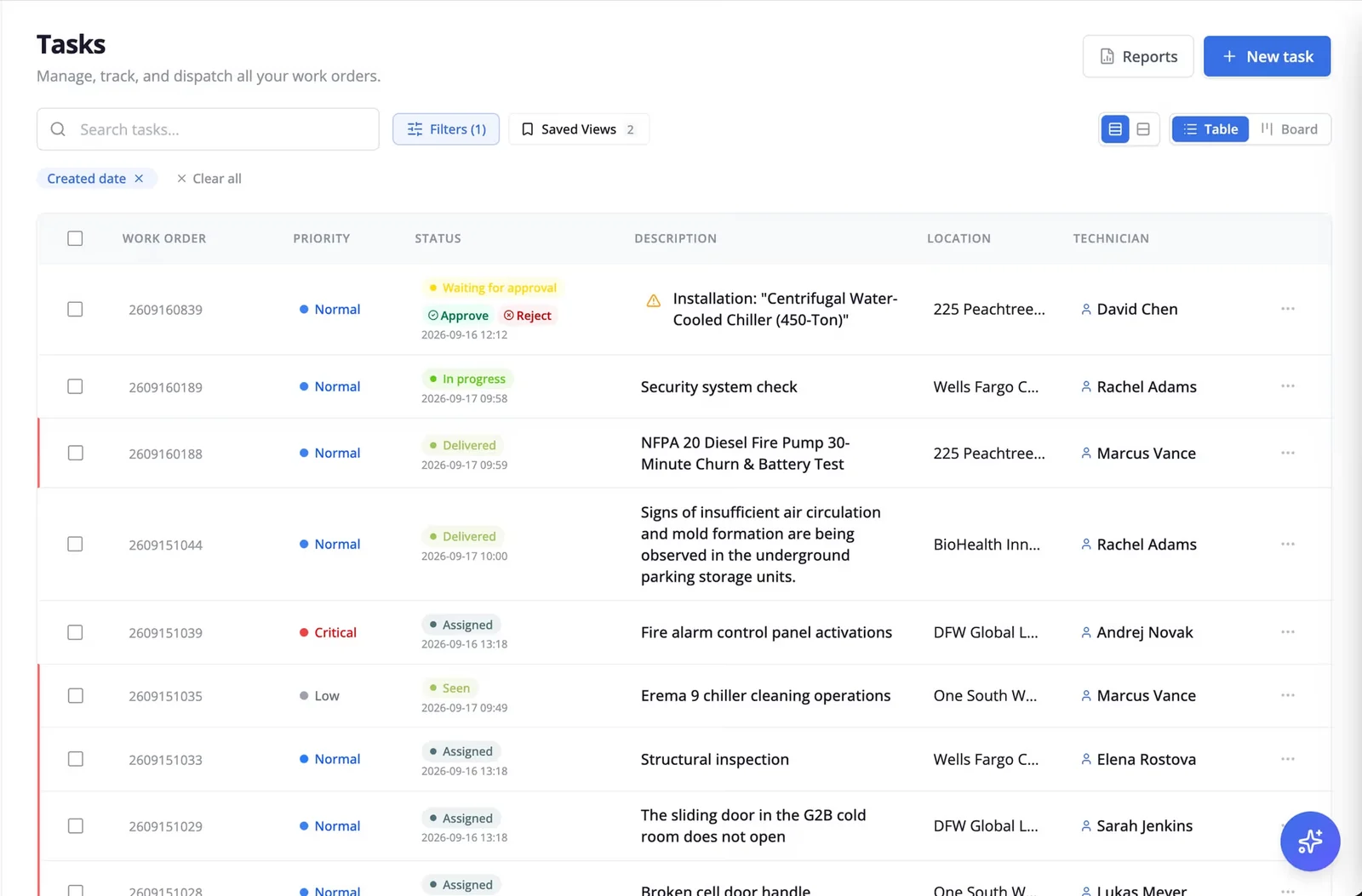
- Self-check: If your operations manager went on holiday tomorrow, could someone else see every open request, from every channel, in one place?
- Watch: avoidable dispatch rate. Better-described requests get triaged properly, so fewer visits turn out to be unnecessary.
2. Triage against a written priority matrix
Priority decides how fast you have to respond, so it shouldn't depend on who happens to answer the phone or how loudly the client is talking. Write the levels down, base them on consequences, and give examples your dispatchers will recognize:
| Priority | What it means | Examples |
|---|---|---|
| P1 Emergency | Risk to people, security or the client's critical operations | Lift entrapment, gas smell, loss of cooling to a server room |
| P2 Urgent | A building or floor has lost an important function | One of two chillers down in July, no heating on a whole floor |
| P3 Routine | A local fault with a workaround | A leaking tap, one dead light fitting |
| P4 Planned | Cosmetic or can wait for the next visit | A cracked ceiling tile, signage |
The response targets for each level belong in the contract. Our service level agreement template includes a matrix like this one with suggested targets you can adjust.
Also write down who can change a priority. If a P1 turns out on site to be a P3, the technician should be able to downgrade it, with a note. If a P3 starts leaking through a ceiling, someone needs to be able to upgrade it without waiting for approval.
Expect some priority creep: when "emergency" gets a two-hour response, more calls get logged as emergencies. Compare logged P1s with confirmed P1s each month, and if the gap keeps growing, show the figures to the client at your next review.
- Self-check: Could two of your dispatchers, given the same five requests, assign the same priorities?
- Watch: SLA compliance measured separately for each priority level, never as one blended percentage.
3. Fix remotely before you send someone
Some faults don't need a van. A heat pump in lockout that needs a reset, a BMS alarm that's already cleared, an isolator someone switched off by mistake. Aquant's 2026 field service benchmark, drawn from 161 service organizations, estimates that about one case in five could have been resolved remotely.
A facility manager calls to say the heat pump on level 3 has stopped. With a triage script for your most common faults, whoever answers can ask whether the unit shows a lockout code, whether the isolator is on, and whether anyone has tried a reset. If you have remote access to the client's BMS, look there first. If that doesn't settle it, a five-minute video call with a senior technician often will. Agree these basic first checks with the client and put them in the contract, so being asked to try a reset doesn't come as a surprise.
Measuring remote fixes on their own can backfire. A dispatcher under pressure to cut visits might talk a facility manager through a reset on a tripping chiller three weeks running, when what it needed was a technician. Count remote fixes, but put them next to SLA compliance and repeat calls on the same asset.
- Self-check: Do you know which of last month's visits ended with "no fault found" or a fix the client could have done themselves?
- Watch: avoidable dispatch rate, paired with SLA compliance.
Planning and scheduling
4. Protect planned maintenance from reactive work
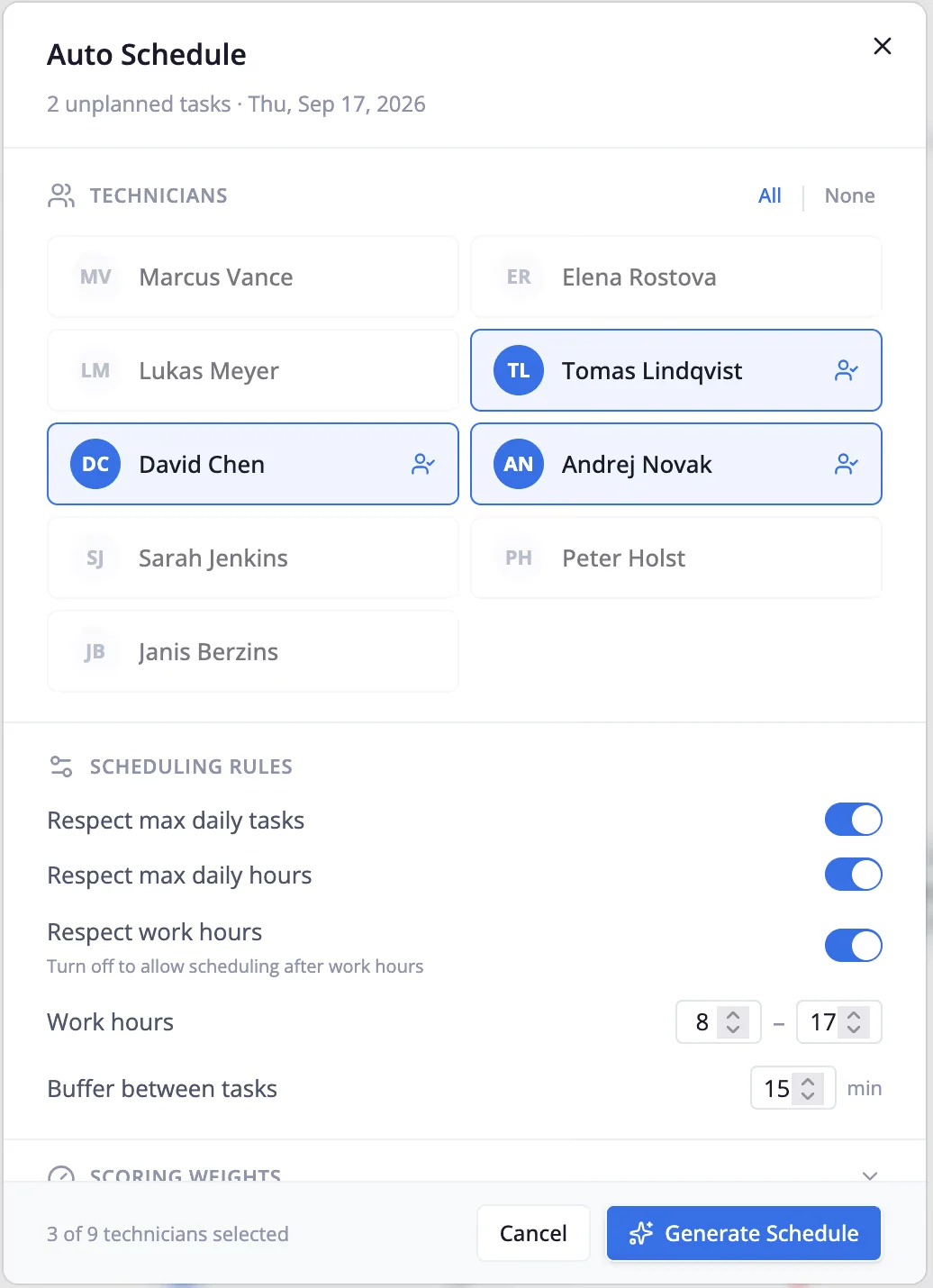
Say a P2 comes in at 10 a.m. and the only technician free is booked on a quarterly filter change. Moving the filter change is the right call. But if that happens most weeks, planned work drifts a few days at a time and nobody notices. Often the first person to notice is an auditor asking for fire damper inspection records. Or it's a tenant on the fourth floor, when an air handler that missed two services stops in a July heatwave.
Book capacity for planned work and protect it. Some contractors give one or two technicians a fixed PM route on set days. Others hold back part of everyone's week. Both approaches work, provided a reactive job can only take PM time with a manager's approval.
Due windows should vary by task. Moving a quarterly filter change by two weeks is unlikely to do any harm. A statutory inspection usually can't move at all, so put it in the schedule as fixed. Our preventive maintenance checklist lists what each type of visit should cover. With automated PM scheduling, the visits are created in the plan months in advance, so nobody has to remember them.
A warning on the numbers you'll see quoted for this. You'll often find reactive maintenance described as costing "three to five times" more than preventive work, attributed to the US Department of Energy. A ReliaMag review of the DOE's O&M Best Practices Guide found no trace of that multiple. The guide's own figure is closer to 12% to 18% savings for a functioning preventive program, and sources differ on how that figure is derived, so cite it with care. It's a smaller number than the one you'll see quoted, and it's still a good argument.
- Self-check: How many PM visits due last month were completed inside their window, and do you know without running a report?
- Watch: PM compliance, split between statutory and non-statutory tasks.
5. Dispatch on skills, certifications and parts before distance
A familiar morning: a P2 comes in for a rooftop chiller that's tripping on high pressure. Technician A is ten minutes away. He's a strong electrician but doesn't hold the refrigerant handling certification the job may need, and his van doesn't carry the condenser fan motor that's the most likely culprit. Technician B is 35 minutes away, certified, and has the part.
Send A and you've met the response target. You've also probably booked a second visit, a second trip and a second SLA conversation. Send B and the client waits 25 minutes longer for someone who can finish the job.
Aquant's 2026 benchmark puts a price on getting this wrong. At the median organization, visits that failed to fix the problem accounted for 25% of total service cost; for the bottom fifth of performers, it was 44%. So rank candidates in this order: qualified for the work, likely to have the parts, able to reach the site inside the SLA window, then closest. A dispatch tool that can see certifications, van stock and location together makes this a matter of seconds. With a whiteboard and a phone, it depends on the dispatcher's memory, which works until that dispatcher is on holiday.
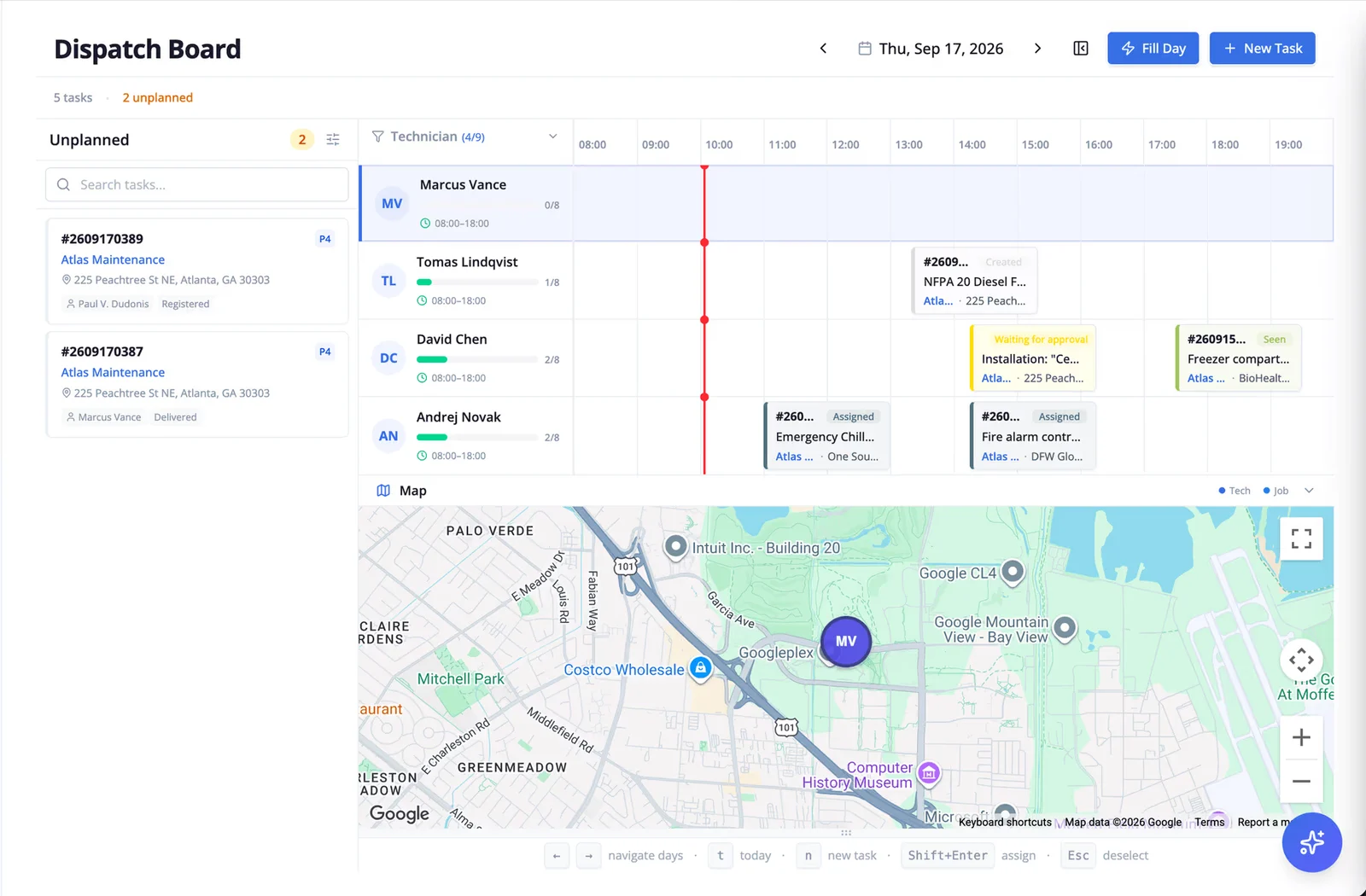
One side effect to watch: if only two people hold a certification, they'll end up with every job that needs it. Look at who's being sent where each month, and use the pattern to decide who gets trained next.
- Self-check: Can your dispatcher see a technician's certifications and van stock at the moment of assigning a job?
- Watch: first-time fix rate, paired with repeat visit rate.
6. Group work by area and keep slack for emergencies
Travel is easy to underestimate when you're filling a calendar. A technician who drives from the north side of the city to the south and back again before lunch can have a full schedule and very little maintenance done. Grouping planned work by area fixes most of this. Book PM visits in the same business park on the same day. Let technicians start from home when their first job is closer to home than to the depot. Over time, draw rough zones around where your contracts are and keep the same people in them.
Leave some room in the day as well. If every slot is filled at 7 a.m., a P1 at 9:15 means moving other jobs, and it's rarely just one. In a 2025 Salesforce survey of US technicians, respondents estimated that 47% of their appointments don't go to schedule. Some contractors keep a short buffer in each technician's day. Others keep one technician per area lightly loaded to pick up emergencies. Either costs less than rebuilding the board every time a P1 comes in.
Our guide to field service route optimization covers zoning, sequencing and fitting in emergencies in more detail, with a worked example.
- Self-check: When a P1 comes in at mid-morning, how many other appointments typically move?
- Watch: travel time ratio and schedule adherence.
Preparation and execution
7. Send technicians prepared
A lot of failed first visits are decided before the technician leaves the depot. They arrive without the asset's service history, so they repeat a diagnosis someone did last month. Nobody told them the plant room key is held by a different security desk on weekends, so 40 minutes go on finding it. The part they need is sitting in a colleague's van across town.
Before each job, the technician should be able to see on their phone:
- the asset's history, including the last visit's notes and photos
- access details: who holds keys, permits or inductions needed, parking, site hours
- the parts usually needed for this job type, and whether they're in the van
- anything the client said when reporting the fault, in their own words
The parts piece is where most contractors have the biggest gap. A default parts kit per job type, van stock that's reconciled weekly, and a dispatcher who can see van stock when assigning work (practice 5) will prevent more return visits than almost anything else on this list. Our guide to field service inventory management goes into van stock in detail.
- Self-check: Pick three jobs from yesterday. Did the technician have the last visit's notes before arriving at each one?
- Watch: first-time fix rate and repeat visit rate. If you record a reason code for return visits, "parts not available" should shrink first.
8. Make the mobile app quicker than paper, and make it work offline
A mobile app is supposed to cut admin, and often it adds to it. If closing a job takes eleven screens, technicians will scribble on a service sheet and type it up on Friday, or not at all. If paper feels easier than the app, technicians will stick to paper. That's a design problem more than a discipline problem.
In a 2025 Salesforce survey, technicians estimated they lose more than seven hours a week to tasks that add little value, such as keying in data and writing up job summaries. The close-out screen is a good place to win some of that back. Remove any field that doesn't end up in a report, on an invoice or in the asset's history.
Then take the app down to a basement plant room or a lift shaft and try to close a job there. If it can't save a checklist, a photo and a signature without signal and sync them later, technicians in those places will go back to paper. Some apps let you view jobs offline but not close them, so test that specifically before choosing a fully offline mobile app.
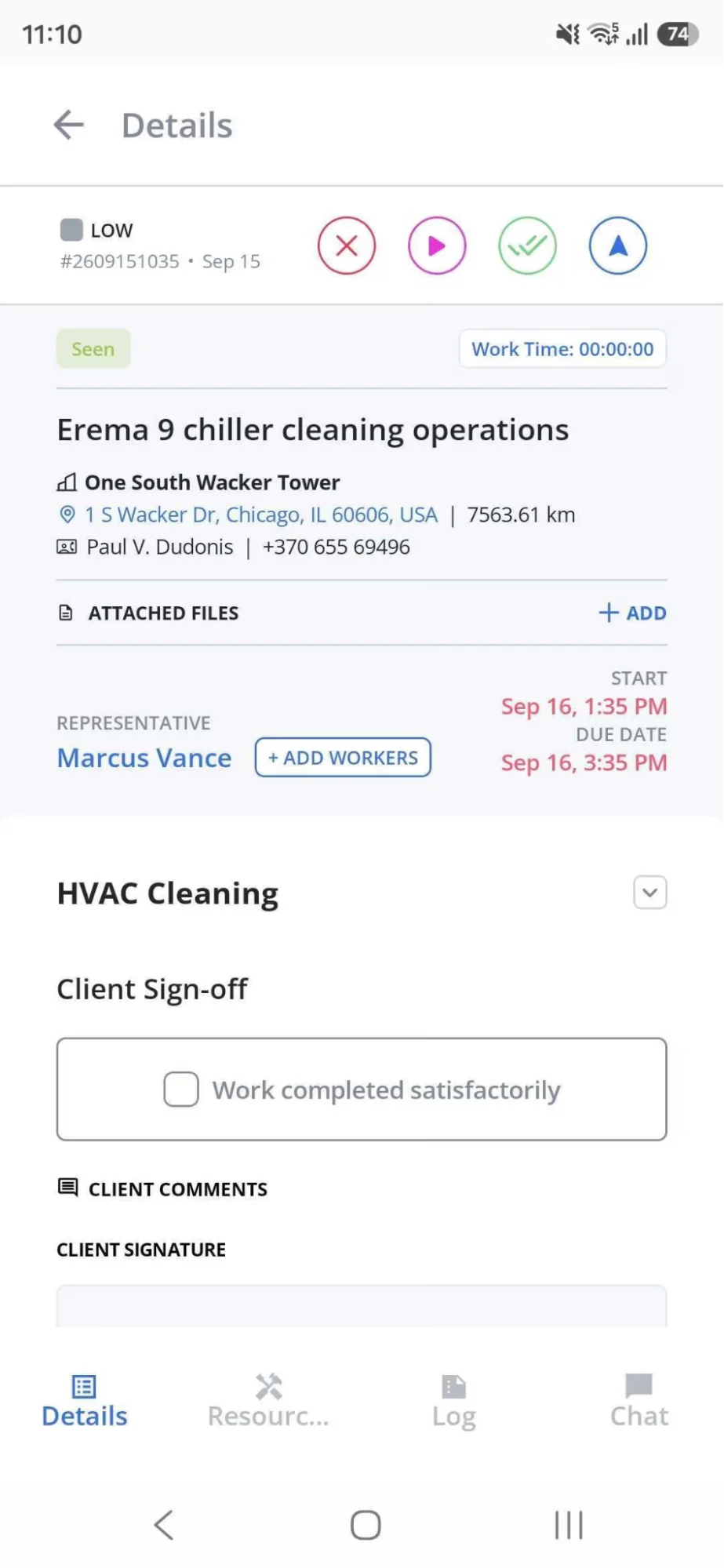
- Self-check: Time how long it takes a technician to close a routine job on the app. Then ask them what they'd remove.
- Watch: wrench time (the share of the shift spent working on equipment), and how many jobs are closed on the same day they're completed.
9. Use checklists where they matter
Checklists earn their place on statutory inspections, safety-critical work and planned maintenance, where missing a step has consequences and an auditor may ask to see proof. On those jobs, make the important items mandatory and ask for evidence: a photo of the fire panel display, a pressure reading, a refrigerant leak check result.
The failure mode is the 80-item checklist that gets completed in 40 seconds. When everything is mandatory, technicians learn to tick down the page without reading it, and the checklist becomes a record that the box was ticked. Keep each checklist to what an auditor or the next technician would genuinely need. Use conditional items so a question only appears when it's relevant (no point asking about the second compressor on a single-compressor unit).
If your system logs how long each checklist takes to complete, look at the fastest ones occasionally. A 20-point inspection finished in under a minute is worth a conversation.
Custom digital forms with required photos and conditional logic make this easier to enforce than paper.
- Self-check: Which of your checklists has the most items, and when did anyone last remove one?
- Watch: repeat visit rate on PM jobs, and the number of findings in client or regulatory audits.
Close-out and billing
10. Close the job on site and invoice from the signed record
The last ten minutes on site decide how quickly you get paid and how often you end up arguing about it. If the technician leaves with a half-completed paper sheet, the job is effectively still open. Someone in the office has to chase the missing signature, guess at the hours, check which parts were used, and type it all into the accounting system. With paper, that commonly adds days, and every gap in the record is something the client can dispute.
Before leaving, the technician should record:
- what was done, in a sentence a facility manager will understand
- before and after photos, plus readings where they apply
- labor hours and travel time
- parts used, so van stock is deducted and the parts land on the invoice
- the client's sign-off, or a note of who was asked and wasn't available
Then the invoice should come from that record, with nobody retyping it. Caverion Baltics, with more than 300 technicians, cut invoice compilation from about two days to real time once invoices were generated from signed mobile work orders. SOL Baltics, a facility service provider, reports that disputes over completed work were virtually eliminated once timestamped photos and digital signatures came with every invoice.
Two cautions. Measure the lag from client sign-off to invoice, not from when the technician marks the job done, or you'll mix two different delays. And don't invoice before the client has signed, even if it flatters the number. It just moves the delay into disputes.
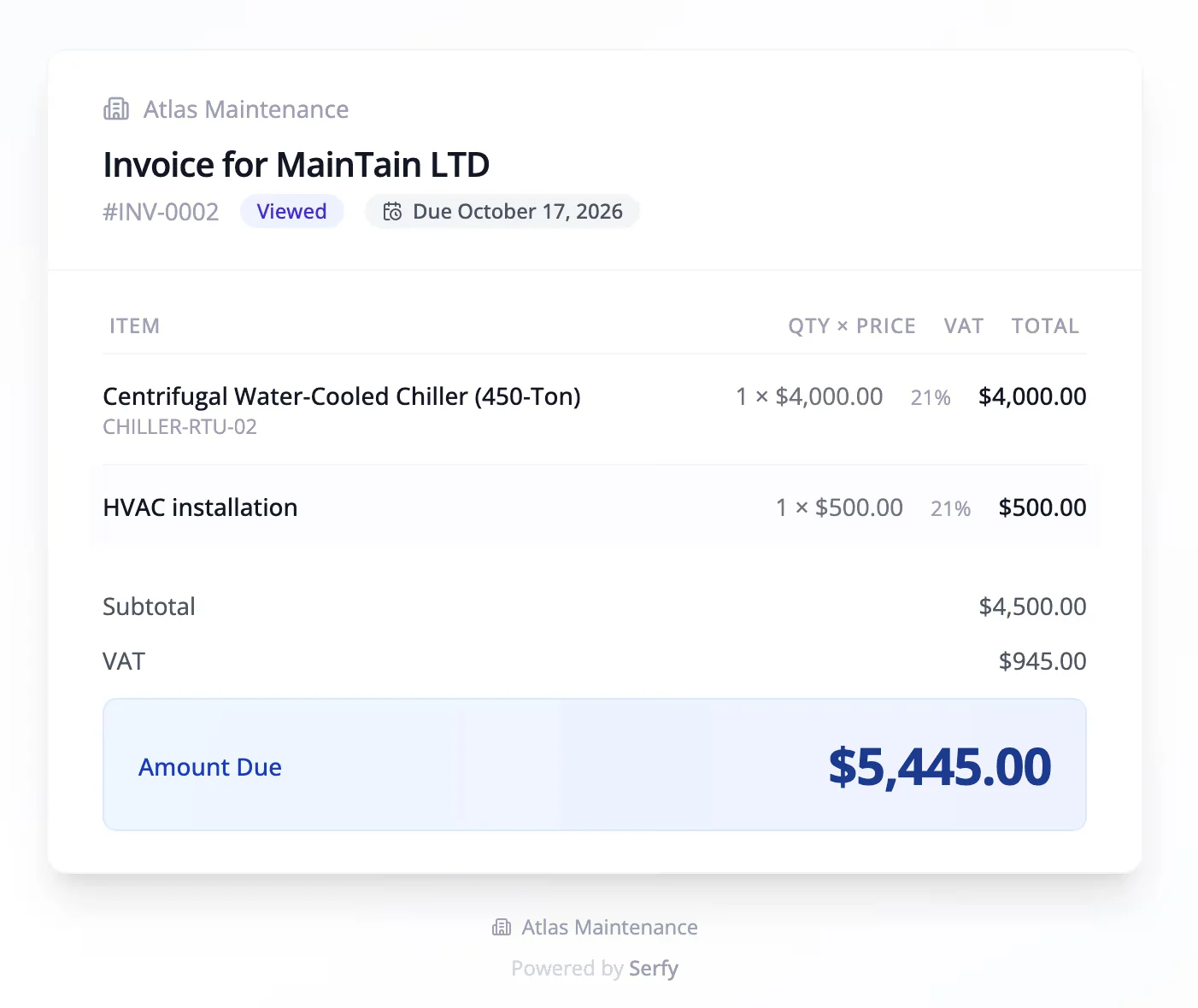
- Self-check: For jobs finished last week, what's the median number of days between sign-off and invoice?
- Watch: completion-to-invoice lag, paired with invoice dispute rate. Automated invoicing is usually the quickest win on this list.
Managing the operation
11. Run subcontractors through the same workflow
Most commercial contractors subcontract something: lifts, specialist fire suppression, roofing, out-of-area callouts. The client doesn't distinguish. If a subcontracted P1 misses its target, it's your SLA breach.
Yet subcontracted jobs are often the least visible part of the operation. They go out by email, the subcontractor does the work, and the first real information arrives with their invoice three weeks later. By then you've already reported the month's SLA figures to the client, possibly wrongly.
Give subcontractors the same work order your own technicians get, with the same clock, the same evidence requirements and the same sign-off before payment. The obvious objection is that you don't want partners seeing your client rates or contact details. That's reasonable, and it's a permissions problem. Good subcontractor management tools let partners log hours, parts and photos while hiding your billing rates from them.
- Self-check: Right now, can you see the status of every open job a subcontractor is handling for you?
- Watch: SLA compliance and first-time fix rate, split between your own technicians and each subcontractor. The split often explains a bad month.
12. Review five numbers on a fixed rhythm
The previous eleven practices all produce data. This one is about looking at it regularly, and looking at only a few numbers.
If you're starting from nothing, track five: first-time fix rate, SLA compliance by priority, mean time to resolution, completion-to-invoice lag and gross margin per job. Our field service management metrics guide covers how to calculate each one, the counting decisions to settle before your first report, and the paired metrics that stop people gaming them.
The rhythm matters as much as the selection. A pattern that works for most commercial teams:
| How often | Who | What they look at |
|---|---|---|
| Daily | Dispatch, service manager | Open emergencies, jobs at risk of breaching SLA |
| Weekly | Service manager, team leads | First-time fix, repeat visits, schedule adherence, backlog by age |
| Monthly | Operations and finance | Margin by job type and contract, invoice lag, PM compliance |
| Quarterly | Account managers, with each key client | SLA performance, recurring faults, recommendations |
Keep the meetings short and finish each with one decision. A weekly review that ends in "let's keep an eye on it" every time will stop happening by spring.
- Self-check: When did a number on your dashboard last change a decision?
- Watch: whether the other eleven practices are moving the five numbers. If none of them has moved after a quarter, revisit which practices you actually changed.
Score your operation
The scorecard turns the twelve self-checks into one page you can fill in with your team. Answer each question as yes (2 points), partly or inconsistently (1 point) or no (0 points). Your total is out of 24.
- 0 to 8: start with intake (practices 1 and 2) and close-out (practice 10). They're the cheapest to fix and produce the data everything else depends on.
- 9 to 16: the basics are in place. The biggest gains are probably in dispatch and preparation (practices 5 and 7), where first-time fix is won or lost.
- 17 to 24: you're in good shape. Look at subcontractor visibility and whether your reviews lead to decisions (practices 11 and 12).
Score it with your service manager and a dispatcher if you can. You'll often score the same question differently, and the questions you disagree on are usually the ones to look at first.
The second page of the scorecard is a symptom guide. Find the problem that hurts most, such as invoices going out a week late or second visits for missing parts, and it points to the practices to look at first.
FAQ
What are the most important field service management best practices?
For commercial service teams, the ones with the biggest effect are dispatching on skills and parts (practice 5), sending technicians prepared (7) and closing jobs on site with a signed record (10). The first two decide your first-time fix rate, which drives a large share of service cost. The third decides how fast you get paid.
How can I make field service more efficient without hiring?
Cut failed visits and travel before anything else. Aquant's 2026 benchmark found that failed visits made up a quarter of service cost at the median organization. Every visit you avoid repeating is technician time you get back. Grouping planned work by area and protecting some slack for emergencies recovers more.
What's the difference between field service best practices and a field service strategy?
A strategy sets the goals: which clients and contracts you go after, what service levels you sell, how you'll grow. Best practices are the day-to-day habits that let you deliver on those goals consistently. You can have a sound strategy and still lose money on poor execution.
How do I get technicians to actually use field service software?
Make it faster than the paper it replaces, make sure it works with no signal, and remove every field nobody uses. Then show technicians what happens with the data, such as fewer callbacks to the office or less end-of-week paperwork. Mandating it without fixing the tool rarely lasts.
How often should field service KPIs be reviewed?
Emergencies and SLA risks daily, operational metrics weekly, financial metrics monthly, and contract performance quarterly with each key client. The table in practice 12 shows who should look at what.
Should subcontractors use the same field service system?
Ideally, yes. Your client sees one SLA, so you need the same visibility over subcontracted jobs as your own. Use a system that lets partners record their work without seeing your client pricing.
Build the habits into the work order
A practice written in a policy document lasts until the first busy week. The ones that stick are built into the tools people use every day: the request form that won't submit without a site and asset, the dispatch screen that shows who holds the certification, the close-out that can't finish without a signature.
Serfy is built around that idea. Clients log requests through a portal, dispatch ranks technicians by certification, location and van stock, the mobile app works offline, and signed work orders turn into invoices without anyone retyping them.

Founder & Global CEO of Serfy. A software engineer by background, Povilas has spent over a decade architecting mission-critical field service workflows, 100% offline SQLite mobile engines, and automated billing pipelines powering 2.7M+ completed work orders across Europe.