Free Job Costing Template for Field Service and Maintenance Contractors


All service contractors, after being in the business for long enough, will have a contract that's like this: they've run for years, kept only a small team busy, and the client always pays on time. The team knows the sites well enough to find any plant room without asking, and when anyone in the office talks about the good accounts, it's usually the first one mentioned.
And yet, when you did the math at renewal time, there was no margin left at all once you compared the costs with the fees. There are many potential explanations for this, from callouts that crept up to older plants needing far more attention than the price allowed for, and so on and so forth. Each visit made sense on the day, and with the fee arriving every month regardless, the cost of all of them together went unnoticed until someone sat down with the work orders.
If you've been calculating that sum by hand, try this template instead. It works out what an hour of your labor really costs, uses that rate to cost each job, and then rolls the jobs up against the contract they belong to.
What's in the template
| Worksheet | What it does | When you use it |
|---|---|---|
| 1. Rates | Helps you work out a fully loaded hourly cost per technician grade, plus your parts markup and callout rules | Once a year, and whenever wages or vehicle costs change |
| 2. Job cost sheet | Costs one job, estimate against actual, line by line | When quoting, and after any job that went wrong |
| 3. Job log | One row per completed job, with space to work out the margin | Every week (or month), from closed work orders |
| 4. Contract P&L | Rolls the job log up against each fixed-fee contract and compares it with what you assumed when you priced it | Monthly, and before every renewal |
| 5. Summary | Margin by job type, client and contract, the ten lowest-margin jobs, and the total cost of return visits | Monthly review |
Why construction job costing templates don't fit service work
Most job costing templates available online are built for the construction industry, and they follow a very specific formula that only works for construction jobs. One project is assumed to have forty or so cost codes, paid in stages against a budget, with the so-called "cost centers" concentrated in materials and subcontracts. Ultimately, the template is designed to tell the reader whether the project will finish on budget.
Little of that helps a maintenance contractor. For one, you may have hundreds of jobs, each one with only a handful of cost lines. The job is paid through a fixed monthly fee, time and materials or a quoted price (and often all three for the same client). Cost centers are focused on labor, travel and return visits, and a project budget has almost nowhere to put them. Last but not least, and most importantly, you need to know which job types, sites and contracts are losing money.
This template can tell you precisely that.
Step 1: Work out what a technician hour costs (Rates worksheet)
Job costing often goes wrong before the first job is entered, when the technician's wage is used as the full cost of their time.
The calculation
Here's how the costs add up for one mid-grade technician.
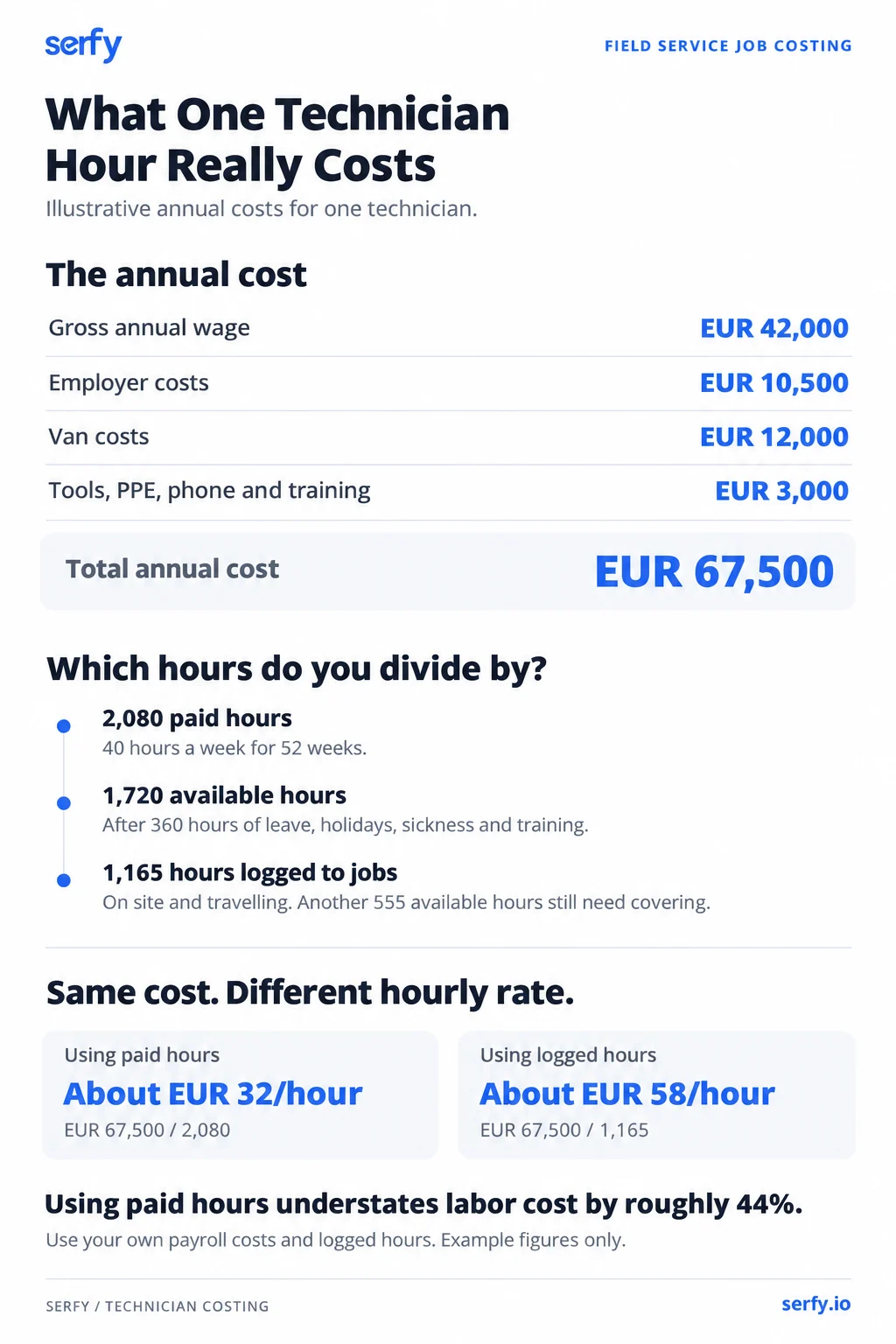
The remaining 555 available hours could be attributed to things like depot runs, waiting for keys, toolbox talks, paperwork and quoting. The client still had to pay for that time, even though it never officially appeared on a work order.
The mistake this avoids
When you divide the same €67,500 by all 2,080 paid hours, you get about €32 an hour. When you cost jobs at this rate, you'll be underestimating labor cost by about 44%, making every job and fixed-fee contract look more profitable than it really is.
Those unlogged hours still need to be covered. You can include them in the hourly rate, as we've done here, or treat them as overhead. Either approach works, so long as you apply the same rule consistently across your whole operation.
Employer costs vary a lot by country
The 25% we included in this worked example is a placeholder. Replace it with your own payroll figures. In the U.S., BLS figures for June 2026 put average private industry compensation at $46.89 per hour worked, with wages accounting for 70% and benefits 30%.
In Europe, Eurostat's 2025 figures put average hourly labor costs at €34.9 across the EU and €38.2 in the euro area. Non-wage costs made up 24.8% of the EU total, from 4.8% in Romania to 32.3% in France, with Lithuania at 5.5%. Be careful how you use that percentage: 24.8% of total labor cost is equivalent to about 33% added on top of wages. Your own payroll figures will give you a more useful rate than either average.
Optional: an overhead rate
You can also calculate an hourly rate for office staff, dispatch, software, premises and insurance. In this example, the client's overheads total about €310,000 a year. When you spread that across 14 technicians logging 1,165 hours each, that's about €19 an hour.
The template keeps overhead in its own column. Gross margin includes direct costs only, following the definition in our metrics guide. Net margin also deducts overhead.
Parts markup and callout rules
The Rates worksheet is also where you note your standard parts markup, client price sheets and your callout or minimum charge. Copy these figures onto each job cost sheet, so every job uses the same pricing rules.
Step 2: Cost a single job (Job cost sheet)
When you're preparing a job, turn to the job cost sheet. Enter the estimate when you quote, and the actual costs once the work is done, in these cost lines:
- Labor on site: hours from arrival to departure, at the loaded rate.
- Travel: costed at the same rate.
- Parts at cost: the price you paid the supplier. The markup goes in revenue.
- Consumables and sundries: fixings, sealant, cable ties and similar. They're small individual expenses, but worth tracking when you multiply them across dozens or hundreds of jobs.
- Subcontractor charges: the subcontractor's invoice.
- Other direct costs: access equipment hire, parking, waste disposal, express delivery.
- Return visits: every extra trip for the same fault is costed on the original job.
Worked example: a chiller fan motor replacement
A technician diagnoses a faulty chiller fan motor, orders the part and returns to fit it. The client quotes €1,450 for the job.
| Line | Estimated when quoted | Actual |
|---|---|---|
| Labor on site | 3 hours × €58 = €174 | 3.5 hours × €58 = €203 (1.5 + 2.0 across two visits) |
| Travel | 1 hour × €58 = €58 | 1.5 hours × €58 = €87 (two trips) |
| Fan motor, at cost | €640 | €640 |
| Express delivery | €0 | €45 |
| Sundries | €25 | €25 |
| Total direct cost | €897 | €1,000 |
| Price charged | €1,450 | €1,450 |
| Gross margin | €553 (38.1%) | €450 (31.0%) |
The job still made a profit, but its margin was seven percentage points lower than quoted. The estimate allowed for one trip and no delivery charge. If the part can only be ordered after diagnosis, the price needs to cover a second trip too.
Step 3: Log every job (Job log)
Enter each completed job on its own row in the job log, using these columns.
| Column | What to enter | Notes |
|---|---|---|
| Job ID, date signed off | From the work order | |
| Client, site, contract | Names | Contract, or "ad hoc" |
| Job type | PM, reactive, quoted, installation | Choose one from the list |
| Billing basis | Contract fee, T&M, quoted price | Choose one from the list |
| Revenue billed | Amount | Leave blank for fixed-fee jobs (see below) |
| Hours on site, travel hours | From the work order timestamps | |
| Labor cost | Work it out: hours × loaded rate | Use the loaded rate for the technician's grade, from the Rates worksheet |
| Parts at cost, consumables, subcontractor, other direct | Amounts | Parts at what you paid |
| Total direct cost, gross margin € and % | Add up the direct costs, then subtract the total from the price charged | |
| Return visit? (Y/N) and reason code | Part not available, misdiagnosis, access, client-requested, other | |
| Estimated cost and variance | Estimated cost, and the difference from the actual cost | For quoted jobs |
| Notes | Free text: write anything you want here |
Agree on how to record costs
For jobs covered by a fixed fee, leave revenue blank and record the full cost. The Contract P&L worksheet compares those costs with the fee. If you divide the fee between individual jobs, every row can look profitable while the jobs that cost the most stay hidden.
Record warranty and callback costs against the original job, with no additional revenue.
Record parts from van stock at their purchase cost when they're used. Our guide to field service inventory management explains how to track those stock deductions.
For subcontracted jobs, use the subcontractor's invoice, and add your own coordination time.
Update the log weekly from signed work orders. Trying to remember hours on a Friday afternoon leaves too much room for guesswork. Technicians in Salesforce's 2025 survey already reported spending about 30% of their working time on admin, so it's easier for everyone to use the timestamps they supply than to reconstruct the week from memory.
Step 4: Roll jobs up to the contract (Contract P&L)
This worksheet compares the costs you allowed for when pricing each fixed-fee contract with the actual costs for the month or quarter.
Worked example: the Harbour Point contract
In this example, our client maintains HVAC and plumbing across a complex called Harbour Point, four buildings for €6,500 a month. The fixed fee covers planned maintenance, labor for P1 to P3 faults, and all consumables. Parts costing more than €100 each and work outside the contract's scope are quoted separately.
Here's how July to September worked out.
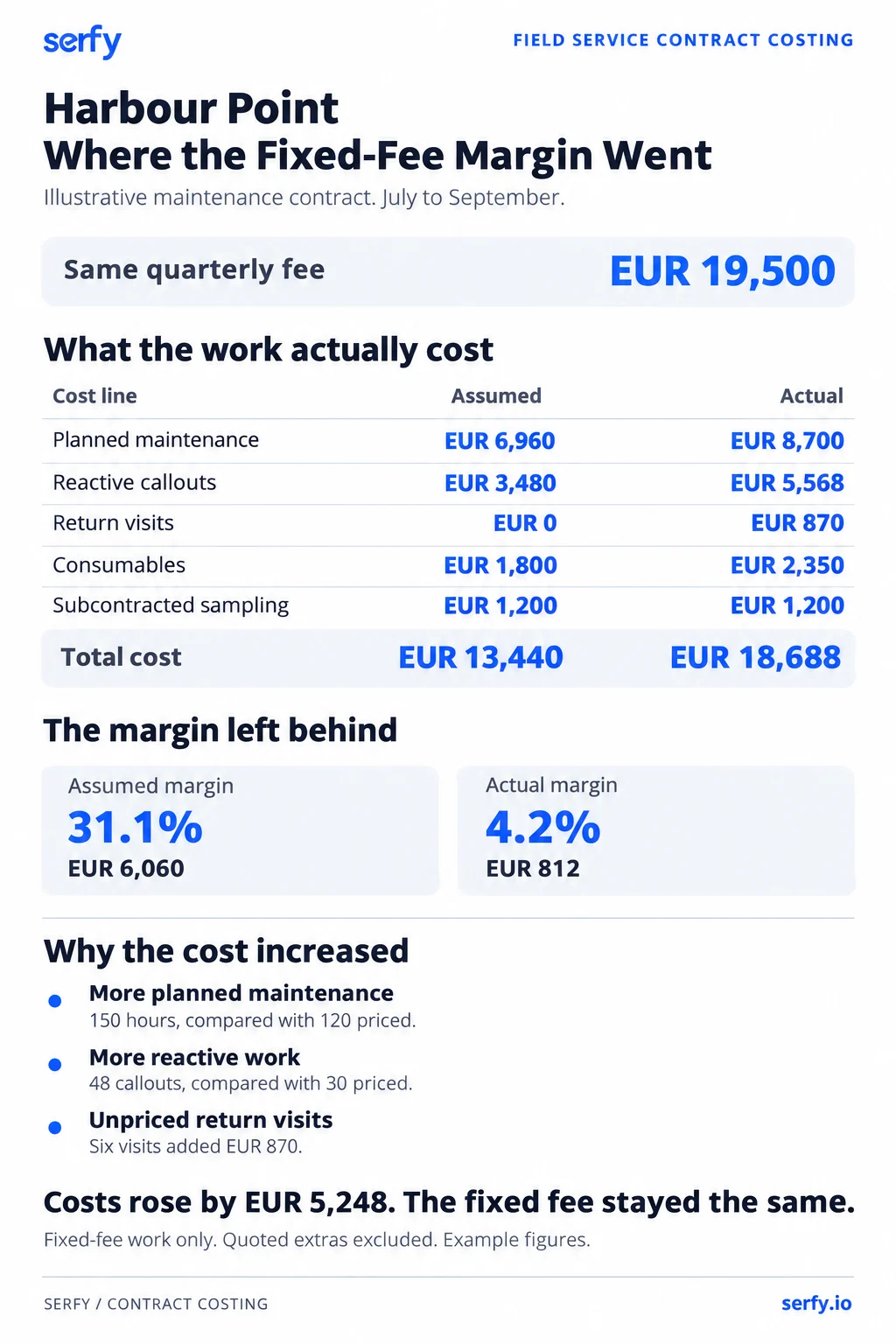
The property customer also paid €4,200 for quoted extras that cost €3,190 to deliver, a margin of 24%.
In total, the Harbour Point contract brought in €23,700 against costs of €21,878, a margin of 7.7%. The extras made up for much of the low margin on the fixed fee, which is how the account still looked healthy in revenue reports.
Finding the cause
When we sort the job log by site and asset, Building C stands out: it accounts for 26 of the 48 callouts and four of the six return visits. Most of them involved two air handling units installed in 2004. With that history, we have three options to discuss with the client at renewal:
- Reprice Building C to reflect the extra attention and work it requires.
- Move the two AHUs onto time-and-materials cover, outside the fixed fee.
- Quote to replace the units, using the callout history to back our case.
Bring these figures to the quarterly SLA review too. Our SLA template helps structure the meeting, and the Contract P&L worksheet provides the cost breakdown for the discussion.
Reading the results
Once you've logged a quarter's work, look for these patterns on the Summary worksheet.
| Pattern on the Summary worksheet | Likely cause | What to check |
|---|---|---|
| One job type consistently below margin | Labor or travel assumptions in your price book | Estimate against actual on recent jobs of that type |
| One site or asset driving callouts | Asset condition or contract scope | Job log sorted by site and asset (the Harbour Point case) |
| Return visits concentrated in one reason code | Parts availability or diagnosis | The return visit review in our inventory guide, and the dispatch practices in our best practices guide |
| Quoted jobs regularly over estimate on labor | Quoting templates out of date | A monthly comparison of estimate and actual |
| Parts cost on jobs higher than parts revenue billed | Parts used but not invoiced, or markups not applied | Unbilled parts reconciliation |
Common job costing mistakes
- Costing labor at the wage rate. That leaves out employer costs, the van and every hour nobody logs to a job. Use the loaded rate from the Rates worksheet.
- Leaving travel out because the contract doesn't pay for it. The technician still gets paid for the drive.
- Opening a new job for the return visit. The original job then looks profitable, and the second visit sits in the log as unpaid work attached to nothing. Return visits add up quickly. Aquant's 2026 benchmark found that failed visits made up 25% of total service cost at the median organization and 44% for the bottom fifth, so cost each one to the job that caused it.
- Costing parts at sell price, or at today's list price. Use what you paid, on the day the part was used.
- Updating once a quarter from memory. By the time a contract shows up as loss-making, it has often already renewed at the same price.
Where the printed template stops working
The template works well for a branch reviewing its monthly jobs. It becomes harder to manage when hours and parts are entered days later, or when several people work from different copies. By the time you've totaled the final costs and invoiced the client, you've also missed the chance to address an overrun while the job is still open.
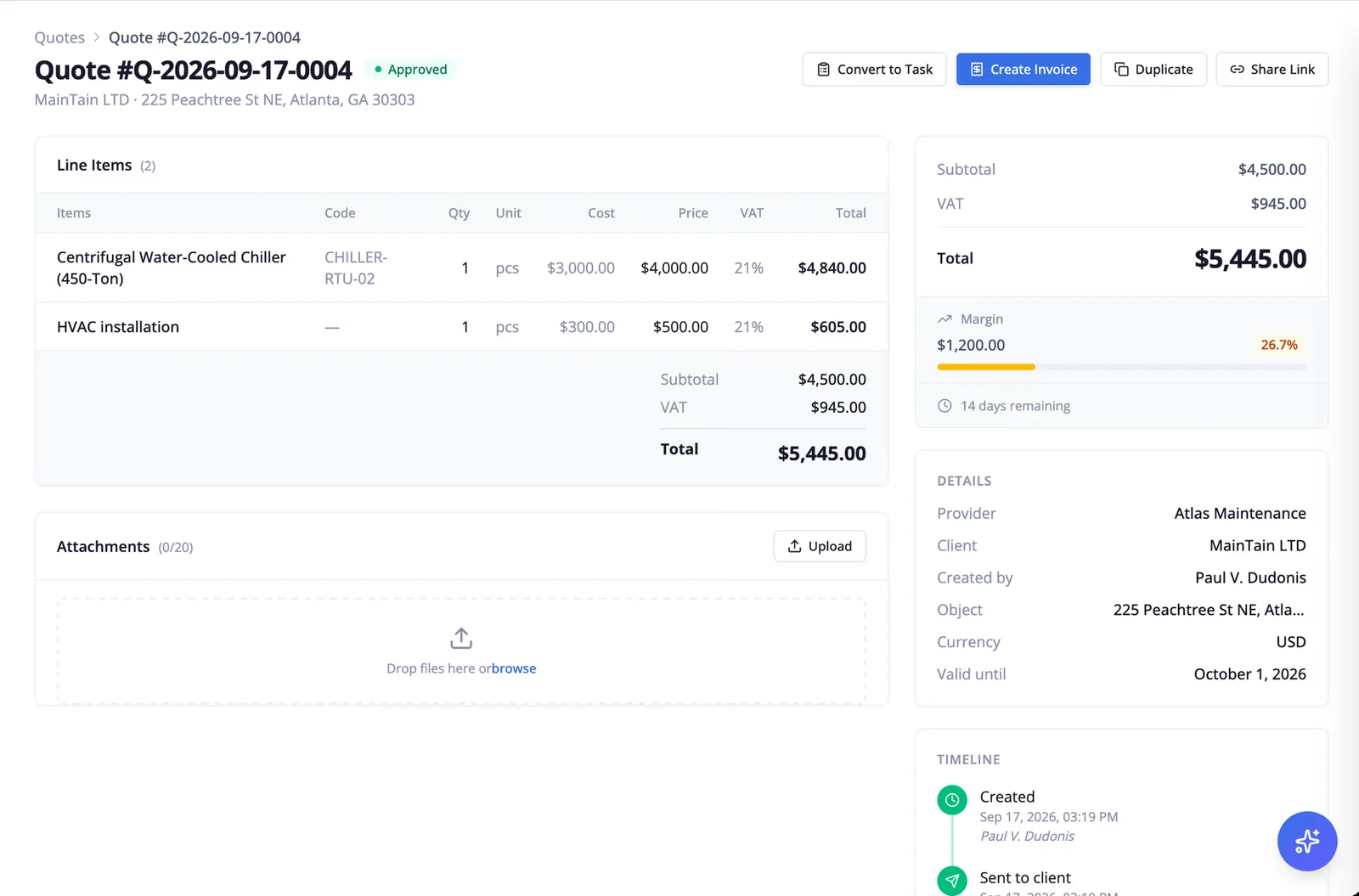
Serfy's live job costing records labor hours, parts taken from van stock and subcontractor charges against the work order as work progresses. You can compare costs with the quote before closing the job, then generate the invoice from the same signed record. Caverion Baltics, which has more than 300 technicians, used this approach to cut invoice compilation from about two days to real time.
FAQ
What is a job costing template?
A job costing template is a set of worksheets for comparing the cost of a job with what you charge. It includes labor and travel at a loaded hourly rate, parts at purchase cost, consumables, subcontractors and other direct costs.
How do you calculate the cost of a job?
Add the labor and travel hours, multiply by the loaded hourly rate, then add the other direct costs:
Job cost = (labor hours + travel hours) × loaded rate + parts at cost + consumables + subcontractor charges + other direct costs
What is a fully loaded labor rate, and how do you calculate it?
It's the annual cost of employing and equipping a technician, divided by the hours they log to work orders. Include wages, employer costs, the van, tools and training.
What's the difference between gross margin and net margin on a job?
Gross margin deducts direct costs such as labor, travel, parts and subcontractors from revenue. Net margin also deducts a share of overhead.
Should travel time be included in job costs?
Yes, at the same loaded rate as time on site.
How do you work out whether a fixed-price maintenance contract is profitable?
Add up the cost of all work covered by the fee over a month or quarter, including planned maintenance, callouts, return visits, consumables and subcontractors, then compare that total with the fee for the same period.

Founder & Global CEO of Serfy. A software engineer by background, Povilas has spent over a decade architecting mission-critical field service workflows, 100% offline SQLite mobile engines, and automated billing pipelines powering 2.7M+ completed work orders worldwide.